Online exams for schools, from the papers you already use
Most schools already have the right exams: years of past papers, mark schemes and department topic tests. Piarrel turns those papers into secure online exams, so pupils sit them on screen and your teachers stop carrying piles of scripts home.
From the paper you have to an exam on screen
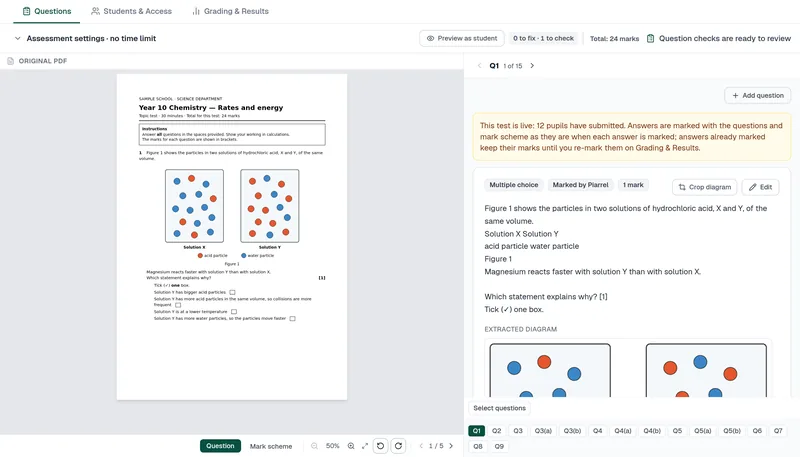
Upload the question paper and its mark scheme, as PDF or Word. Piarrel rebuilds every question, figure, table and mark-scheme point, and walks you through a short check before the exam goes live. If you'd rather not do it yourself, send us the paper: it's ready the next working day.
A proper exam room on any device
- Timed sittings in a window you open and close.
- Extra time set per pupil.
- Reference materials inside the exam, such as the periodic table and data booklets.
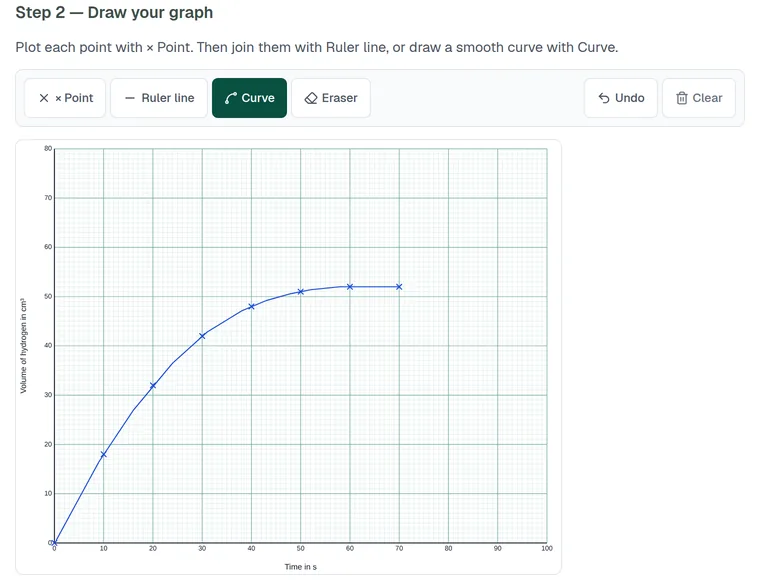
- Graph paper, drawing and diagrams on screen.
- Full screen, with every exit counted for you to see.
- Answers saved as pupils type.
Pupils sit in a web browser on any device, signing in or using a personal link. Before you commit, we check it on your devices with you.
Then Piarrel proposes the marks for you to check
Piarrel proposes marks point by point against your mark scheme, with its reasoning and a confidence level. Graphs, drawings and labelled diagrams are always left for the teacher to mark. In the trial, the median time from a pupil's submit to the marks being ready was 23 seconds. A teacher approves or changes every mark before a pupil sees it.
Questions
Do pupils need an account?
Pupils can sign in, or open the exam from a personal link.
Can pupils leave the exam to search the web?
The exam runs in full screen, and every exit is counted and shown to the teacher.
What happens if a laptop crashes?
If a pupil's laptop crashes, they reopen their exam link and see "Welcome back — your answers are saved." with a Continue button. Every answer saved before the crash is there, and the exam clock keeps running while they are away.
Which papers work?
Cambridge IGCSE and Checkpoint past papers, and your department's own compilations and topic tests.